

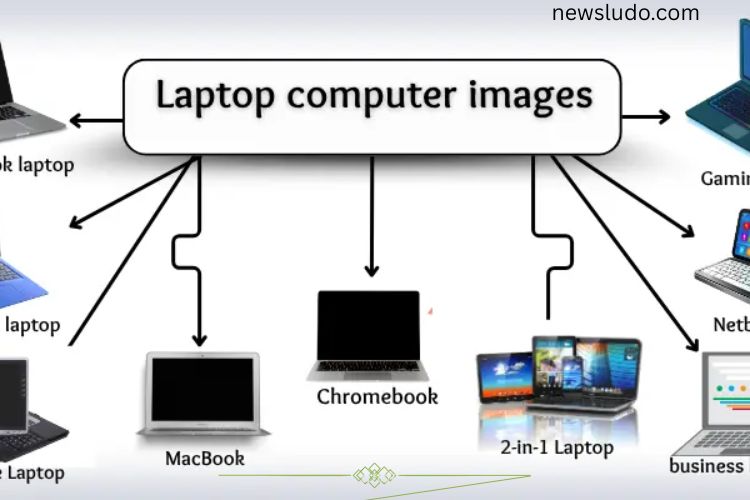
Laptops have become essential tools for work, study, and entertainment in today’s fast-paced world. Compact, portable, and powerful, they allow users to accomplish almost anything—from writing documents and browsing the internet to gaming and video editing. However, understanding the basics of laptops is crucial to make the right choice and maintain your device effectively. This article will guide you through laptop essentials, advantages, disadvantages, and tips to get the most from your machine.
Read More: https://newsludo.com/types-discover-master-and-choose-like-a-pro/
What is a Laptop?
A laptop is a portable computer that combines the functionality of a desktop with mobility. It typically includes a screen, keyboard, trackpad, and battery in a single compact unit. Unlike desktop computers, laptops are designed for convenience and allow users to work from virtually anywhere.
Modern laptops come in various sizes and specifications, catering to different needs—from lightweight ultrabooks for students to powerful gaming laptops for professionals and enthusiasts. Understanding the basic components of a laptop will help you choose the right device for your requirements.
Key Components of a Laptop
Processor (CPU)
The processor is the brain of the laptop, handling all instructions and operations. A faster CPU ensures smoother performance, especially when multitasking or running demanding applications. Common processors include Intel Core, AMD Ryzen, and Apple M1/M2 chips.
RAM (Memory)
RAM temporarily stores data your laptop is actively using. More RAM allows better multitasking and faster performance. For general use, 8GB is sufficient, while power users may need 16GB or more.
Storage (HDD/SSD)
Storage holds all your files and software. Hard Disk Drives (HDDs) are traditional and affordable but slower. Solid State Drives (SSDs) are faster, more reliable, and improve overall laptop speed.
Graphics Card (GPU)
A GPU handles graphics processing, crucial for gaming, video editing, and design work. Some laptops have integrated graphics, while others feature dedicated GPUs for high performance.
Battery
The battery powers your laptop when it’s not plugged in. Battery life varies depending on usage, device efficiency, and screen size. Longer battery life ensures greater mobility.
Advantages of Laptops
Laptops offer several benefits that make them ideal for personal and professional use:
- Portability: Unlike desktops, laptops can be used anywhere, whether at home, in a café, or while traveling.
- Compact Design: Laptops combine multiple components into one device, saving space.
- Ease of Use: Most laptops are ready to use out of the box, requiring minimal setup.
- Versatility: Suitable for work, education, entertainment, and gaming.
- Wireless Connectivity: Built-in Wi-Fi and Bluetooth allow seamless connection to the internet and other devices.
These features make laptops indispensable for users who need flexibility and convenience without compromising on performance.
Disadvantages of Laptops
While laptops offer many benefits, they also have drawbacks that users should consider:
Battery Can Run Out
Laptops rely on battery power for mobility, but battery life varies and can decrease over time. Heavy usage, gaming, or video editing may drain the battery quickly, requiring frequent charging.
Hard to Upgrade
Unlike desktop PCs, laptops are generally harder to upgrade. While RAM or storage can sometimes be expanded, most components, like the CPU or GPU, are built-in and cannot be replaced.
Heat Issues
Laptops can get hot during intensive tasks such as gaming or video rendering. Overheating can reduce performance and, if not managed, may shorten the lifespan of internal components.
High Cost
Powerful laptops often come at a premium price. While budget options are available, high-performance devices with advanced features can be expensive.
Fragility
Laptops are portable but delicate. Dropping or mishandling them can cause serious damage. Even minor accidents may lead to screen cracks, keyboard issues, or internal malfunctions.
Requires Careful Use
To ensure longevity, laptops require careful handling, regular cleaning, and software updates. Neglecting maintenance can lead to performance issues and reduced lifespan.
How to Choose the Right Laptop
Choosing the perfect laptop requires balancing performance, portability, and budget. Here are some tips:
- Identify Your Needs: Decide whether the laptop is for general use, gaming, or professional work.
- Set a Budget: High-performance laptops are expensive, but budget-friendly models can still provide reliable performance for everyday tasks.
- Check Specifications: Look at CPU, RAM, storage, battery life, and GPU to match your requirements.
- Consider Portability: If you travel often, choose a lightweight laptop with long battery life.
- Read Reviews: User reviews can reveal potential issues and highlight advantages that specs alone might not show.
Maintenance Tips for Laptops
Proper care ensures your laptop remains efficient and lasts longer. Here are some essential maintenance tips:
- Keep it Clean: Regularly clean the keyboard, screen, and vents to prevent dust accumulation.
- Manage Heat: Use a cooling pad or ensure proper ventilation during intensive tasks.
- Update Software: Keep your operating system and applications updated to avoid security risks and improve performance.
- Protect from Drops: Use a sturdy laptop bag or case when transporting your device.
- Monitor Battery Health: Avoid overcharging and occasionally let the battery drain to maintain its longevity.
Frequently Asked Questions:
What is the main difference between a laptop and a desktop?
Laptops are portable computers with built-in screens, keyboards, and batteries, allowing you to work from anywhere. Desktops are stationary, often more powerful, and easier to upgrade, but they require a dedicated workspace.
How long does a laptop battery usually last?
Battery life varies depending on the laptop model, usage, and battery health. Most modern laptops offer between 5 to 12 hours on a single charge, but heavy tasks like gaming or video editing can drain the battery faster.
Can I upgrade my laptop’s hardware?
Upgrades depend on the laptop model. RAM and storage are usually upgradable, but the CPU and GPU are often fixed. Always check the manufacturer’s guidelines before attempting upgrades.
Why do laptops get hot?
Laptops generate heat when performing demanding tasks like gaming, video rendering, or running multiple applications. Proper ventilation, cooling pads, and regular cleaning can help manage heat.
Are laptops fragile?
Yes, laptops are portable but delicate. Dropping, spilling liquids, or applying excessive pressure can damage internal components or the screen. Using a protective case and handling with care is essential.
How do I choose the right laptop for me?
Identify your primary use—work, study, gaming, or design. Then consider specifications like CPU, RAM, storage, battery life, and portability. Reviews and user feedback can also guide your choice.
Is it worth buying an expensive laptop?
High-end laptops offer better performance, longer battery life, and advanced features. However, budget laptops can handle everyday tasks efficiently. Your choice depends on your needs and usage intensity.
Conclusion
Laptops have become indispensable tools in today’s fast-paced world, offering a perfect balance of portability, performance, and versatility. Understanding their key components, advantages, and limitations helps users make informed choices and maximize their device’s potential. While laptops provide unmatched convenience, factors like battery life, heat, fragility, and upgrade limitations require careful consideration and proper maintenance. By selecting the right specifications, handling the device responsibly, and following simple care tips, you can enjoy a smooth, efficient, and long-lasting laptop experience. Whether for work, study, or entertainment, mastering essential laptop knowledge empowers you to unlock the full potential of your device and stay productive wherever you go.