
Operating systems (OS) are the backbone of every computer, smartphone, or smart device. They manage hardware, software, users, and tasks, ensuring devices run smoothly and efficiently. Understanding the various types of operating systems helps users, developers, and IT professionals choose the right system for specific needs. Each OS type has unique features and is tailored for particular use cases, from personal computers to embedded devices and enterprise networks.
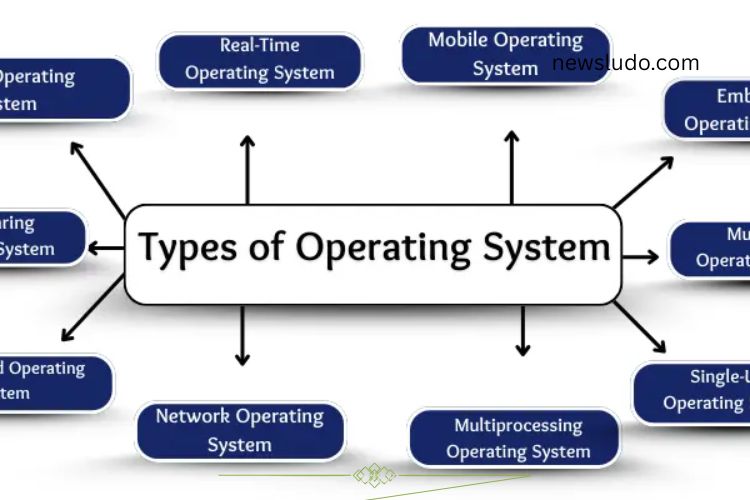
Here’s a comprehensive look at the major types of operating systems and why they matter.
Batch Operating System
Batch operating systems are among the earliest OS designs. They collect jobs and process them in batches without direct user interaction. Users submit jobs, and the system executes them sequentially, freeing human effort from repetitive tasks.
Why Batch OS Matters:
- Automates large-scale tasks efficiently.
- Reduces human intervention, saving time and labor.
- Organizes jobs for smoother execution.
- Ideal for early mainframes and large processing tasks.
Time-Sharing Operating System
Time-sharing operating systems allow multiple users to access a single computer simultaneously. The system divides processing time into slices, ensuring each user experiences fast, responsive performance as if they were the only one using the computer.
Benefits of Time-Sharing OS:
- Supports multiple users without delays.
- Ensures fair allocation of resources.
- Reduces operational costs by sharing one computer across users.
- Widely used in offices, schools, and labs.
Distributed Operating System
A distributed OS links multiple computers into a single networked system. It distributes tasks among connected machines, improving performance and reliability. If one computer becomes overloaded, tasks shift to others automatically.
Advantages of Distributed OS:
- Speeds up processing by distributing workloads.
- Enhances system reliability, as failure of one machine does not halt operations.
- Optimizes resource usage across networks.
- Ideal for complex projects and collaborative environments.
Network Operating System
Network operating systems manage computers connected within a network. They enable seamless sharing of files, printers, and devices while maintaining security and communication between systems.
Importance of Network OS:
- Facilitates file and device sharing among multiple users.
- Simplifies network management for administrators.
- Strengthens security for shared resources.
- Essential in offices, schools, and organizational networks.
Real-Time Operating System (RTOS)
Real-time operating systems are designed for tasks requiring precise timing and immediate response. They are critical in environments where delays can cause serious consequences, such as aviation, healthcare, and industrial control systems.
Key Features of RTOS:
- Delivers instant responses to critical tasks.
- Supports devices requiring timely actions.
- Increases accuracy for time-sensitive operations.
- Widely used in defense, medical equipment, and traffic management.
Mobile Operating System
Mobile operating systems power smartphones, tablets, and other handheld devices. They manage touch interfaces, apps, connectivity, and security. Popular examples include Android and iOS.
Why Mobile OS is Essential:
- Makes devices user-friendly with touch and voice controls.
- Enables communication through calls, messages, and the internet.
- Supports a wide range of apps for work, learning, and entertainment.
- Ensures security and regular updates for improved performance.
Embedded Operating System
Embedded operating systems run inside specialized devices and machines. They handle specific tasks with minimal resource usage, making devices like washing machines, ATMs, cars, and smart appliances efficient and reliable.
Benefits of Embedded OS:
- Automates routine functions of everyday devices.
- Uses minimal memory and power.
- Enhances device performance and longevity.
- Enables machines to operate independently without human intervention.
Multi-User Operating System
Multi-user operating systems allow multiple users to access a single computer simultaneously, with each user’s data and tasks kept separate. These systems are common in universities, large offices, and server environments.
Advantages of Multi-User OS:
- Supports multiple users safely and efficiently.
- Keeps files and activities private for each user.
- Reduces the need for multiple computers, saving costs.
- Handles multiple tasks smoothly for organizations.
Multiprocessing Operating System
Multiprocessing operating systems use two or more processors in one system to handle multiple tasks simultaneously. This setup enhances speed, efficiency, and reliability, making it ideal for demanding applications.
Importance of Multiprocessing OS:
- Increases overall system performance.
- Enables large programs to run without slowing down.
- Reduces system crash risks.
- Supports multitasking for scientific, business, and technical applications.
Single-User Operating System
Single-user operating systems are designed for one user at a time. They manage tasks efficiently for personal computers and laptops, offering simplicity and ease of use.
Benefits of Single-User OS:
- Simple and easy to operate.
- Ensures fast performance for individual users.
- Cost-effective for personal or small office use.
- Reduces confusion by keeping one user in control.
Choosing the Right Operating System
Selecting the right operating system depends on your needs. Personal users may prefer single-user or mobile OS for simplicity and convenience, while businesses and educational institutions often rely on multi-user, network, or distributed OS to handle multiple users efficiently. For specialized devices, embedded and real-time operating systems ensure reliability and precision.
Understanding each OS type helps users maximize performance, security, and productivity while ensuring devices function optimally for their intended purpose.
Frequently Asked Questions:
What is an operating system (OS)?
An operating system is software that manages a computer’s hardware, software, and user tasks. It acts as a bridge between users and devices, ensuring smooth performance and resource allocation.
How many types of operating systems are there?
There are several types of operating systems, including batch, time-sharing, distributed, network, real-time, mobile, embedded, multi-user, multiprocessing, and single-user OS. Each type is designed for specific tasks and environments.
What is the difference between single-user and multi-user operating systems?
Single-user OS allows only one person to use a computer at a time, ideal for personal devices. Multi-user OS supports multiple users simultaneously, keeping their data and tasks separate, perfect for offices, universities, and servers.
What is a real-time operating system (RTOS)?
A real-time operating system processes data and tasks instantly without delays. RTOS is critical in industries where timing is crucial, such as aviation, healthcare, defense, and industrial automation.
How does a mobile operating system differ from a desktop OS?
Mobile operating systems, like Android and iOS, are optimized for touch interfaces, mobile apps, and connectivity. Desktop OS, like Windows or macOS, is designed for larger screens, full software applications, and multitasking.
Why are embedded operating systems important?
Embedded OS run inside devices like ATMs, washing machines, and cars. They handle specific tasks efficiently, using minimal memory and energy, and make machines reliable and automated.
What is a distributed operating system?
A distributed OS connects multiple computers to work as a single system. It shares tasks, improves speed, and increases reliability, making it suitable for collaborative projects and large-scale computing.
Conclusion
Understanding the different types of operating systems is essential for anyone navigating today’s digital world. From batch and time-sharing systems to mobile, embedded, and real-time OS, each type serves a unique purpose and empowers devices to perform efficiently. Choosing the right operating system can enhance productivity, ensure reliability, and optimize the overall user experience. Whether you are a student, professional, or tech enthusiast, mastering the world of operating systems allows you to harness technology more effectively. By knowing their features, strengths, and applications, you can make informed decisions, streamline tasks, and unlock the full potential of your devices.