
A keyboard is one of the most essential tools for using a computer. It allows you to input letters, numbers, symbols, and commands quickly and efficiently. Acting as an input device, it sends signals to your computer whenever a key is pressed. Keyboards are not only for typing documents—they help navigate programs, control applications, and even play games. Most keyboards have different sections, such as letter keys, number keys, function keys, and a numeric keypad, making them versatile and powerful tools for digital tasks.
Read More: Mastering the World of Operating Systems: Uncover the Types That Empower Your Digital Life
History of the Keyboard
The keyboard has a long history that dates back to the invention of the typewriter. In 1868, Christopher Latham Sholes invented the first typewriter and designed the QWERTY layout, which is still widely used today. This layout was designed to reduce typing errors and improve speed, making it easier for people to write efficiently.
When computers emerged, the typewriter’s design inspired the modern keyboard. Over time, keyboards evolved to become smaller, faster, and more user-friendly. Today, keyboards are found not just in desktops but also in laptops, tablets, and even smartphones, demonstrating their enduring importance in the digital world.
How Does a Keyboard Work?
A keyboard communicates with your computer by sending signals each time a key is pressed. The process works in a few simple steps:
- Pressing a key completes an electrical circuit inside the keyboard.
- The keyboard sends a signal to the computer.
- The computer’s processor identifies the signal and matches it to a specific character or command.
- The computer displays the character on the screen or executes the requested action.
- Wireless keyboards work in the same way but transmit signals via Bluetooth or radio waves instead of wires.
Types of Keyboards
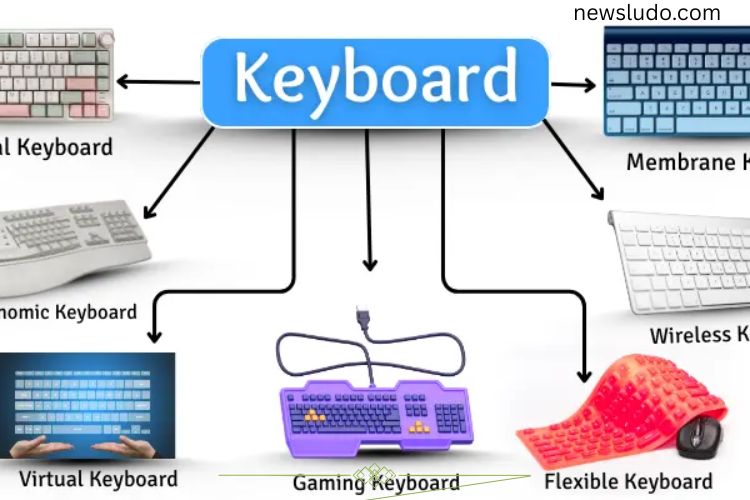
Keyboards are available in many types, each designed for specific tasks. Choosing the right keyboard depends on your needs and preferences.
- Mechanical Keyboard: Uses individual switches under each key for tactile feedback, preferred by typists and gamers.
- Membrane Keyboard: Features a soft, rubber layer under the keys, offering quiet typing.
- Wireless Keyboard: Connects to devices without cables, providing more flexibility.
- Ergonomic Keyboard: Designed to reduce strain on hands and wrists with a split and curved layout.
- Virtual Keyboard: Found on touchscreens in smartphones and tablets.
- Gaming Keyboard: Includes extra keys and faster response times for gaming.
- Flexible Keyboard: Made from soft materials, it can be rolled up for portability.
Parts of a Keyboard
A keyboard consists of several sections, each serving a specific purpose:
- Alphabet Keys: The letters A to Z for typing text.
- Number Keys: 0–9 keys for entering numbers.
- Function Keys (F1–F12): Perform specific actions in programs.
- Arrow Keys: Move the cursor in any direction.
- Control Keys: Ctrl, Alt, and Shift are used in combination for shortcuts.
- Enter Key: Confirms commands or moves the cursor to the next line.
- Backspace Key: Deletes text to the left of the cursor.
- Spacebar: Inserts a space between words.
- Escape (Esc) Key: Cancels tasks or closes windows.
- Caps Lock Key: Switches between uppercase and lowercase letters.
- Tab Key: Moves the cursor forward by a set space.
- Numeric Keypad: A dedicated section for fast number input.
These parts work together to give users precise control over typing and computer navigation.
Uses of a Keyboard
The keyboard is a vital tool in computing, used in everyday tasks and professional work. Its functions include:
- Typing Text: From emails to documents, keyboards make writing fast and accurate.
- Entering Numbers: Essential for calculations, data entry, and accounting tasks.
- Giving Commands: Function keys and shortcuts allow users to control software efficiently.
- Using Shortcuts: Combination keys speed up tasks like copying, pasting, or saving.
- Searching Online: Type queries quickly to find information on the internet.
- Playing Games: Many games rely on keyboards for navigation and control.
- Editing Documents: Delete, move, or modify text easily using keyboard commands.
- Logging In: Enter usernames and passwords securely.
Advantages of a Keyboard
Keyboards come with many benefits, making them indispensable in daily computing:
- Simple and easy to use
- Allows fast typing for work or personal use
- Ideal for long-form writing
- Compatible with most software and applications
- Enables efficient use of keyboard shortcuts
- Can replace a mouse for certain tasks
- Available in multiple types for different needs
- Enhances gaming performance
- Works across desktops, laptops, and tablets
- Simplifies document editing
Disadvantages of a Keyboard
While keyboards are extremely useful, they do have some limitations:
- Requires both hands to operate efficiently
- Prolonged use may cause hand or wrist strain
- Takes up physical space on a desk
- Can be challenging for young children
- Needs regular cleaning to maintain performance
- Keys may stop functioning over time
- Difficult to use in low-light conditions if not backlit
- Can be damaged if dropped
- Wireless keyboards require charging
- Some models are expensive
Choosing the Right Keyboard
When selecting a keyboard, consider your primary use case. Gamers may prefer mechanical keyboards with fast response times, while writers or office workers might benefit from ergonomic or membrane keyboards for comfort and quiet typing. For mobile users, virtual or compact keyboards are convenient, while flexible keyboards are ideal for travel.
Tips for Maintaining Your Keyboard
A keyboard works best when properly cared for. Here are some tips to extend its lifespan:
- Keep your hands clean while typing
- Regularly clean the keyboard to remove dust and debris
- Avoid eating or drinking near your keyboard
- Use a keyboard cover for added protection
- Store flexible keyboards properly when not in use
- Recharge wireless keyboards before battery runs out
Proper maintenance ensures smooth typing and prevents long-term damage.
Frequently Asked Questions:
What is a keyboard?
A keyboard is an input device that allows you to type letters, numbers, and symbols into a computer. It also helps control programs and perform commands efficiently.
How does a keyboard work?
When you press a key, the keyboard sends a signal to the computer, which then interprets the input and displays the corresponding character or executes a command. Wireless keyboards use Bluetooth or radio waves to transmit signals.
What are the main types of keyboards?
Keyboards come in several types, including mechanical, membrane, wireless, ergonomic, gaming, flexible, and virtual keyboards, each designed for specific purposes.
What are the essential parts of a keyboard?
A keyboard has alphabet keys, number keys, function keys, arrow keys, control keys (Ctrl, Alt, Shift), Enter, Backspace, Spacebar, Caps Lock, Tab, Escape, and a numeric keypad for quick data entry.
Can a keyboard be used with smartphones and tablets?
Yes. Virtual keyboards on touchscreens are common in smartphones and tablets, while some wireless keyboards can also connect via Bluetooth.
Why is a keyboard important?
It is one of the most essential tools for typing, data entry, gaming, online searches, shortcuts, and overall computer navigation.
What are the advantages of using a keyboard?
Keyboards allow fast typing, are compatible with most software, support shortcuts, reduce reliance on a mouse, and enhance productivity and gaming performance.
Conclusion
The keyboard is an indispensable tool in the modern digital world. From typing documents and entering data to navigating programs and gaming, it plays a central role in our daily computer use. Understanding its history, types, parts, and functions helps users choose the right keyboard and use it efficiently. While keyboards have both advantages and limitations, proper use and maintenance can maximize productivity, comfort, and longevity. Whether for work, study, or entertainment, mastering the keyboard is a key step toward becoming a confident and efficient computer user.