
Microsoft Word is one of the most widely used word processing software in the world. Whether you are a student, teacher, office worker, or freelancer, Word provides a powerful platform to create, edit, and format documents efficiently. From letters and reports to resumes and books, Word offers everything you need to make your writing professional and polished.
Read More: https://newsludo.com/mastering-computer-network-protocols-the/
What is Microsoft Word?
Microsoft Word is computer software designed for writing and editing text. It allows users to type, format, and enhance documents with features like images, tables, and charts. As a part of the Microsoft Office suite, Word integrates seamlessly with other Office apps like Excel and PowerPoint, making it a central tool for both personal and professional work. Its user-friendly interface and robust features have made it a staple in offices, schools, and homes worldwide.
A Brief History of Microsoft Word
Microsoft Word was first introduced in 1983 under the name Multi-Tool Word, created by Charles Simonyi and Richard Brodie at Microsoft. Initially, it offered only basic tools for typing and formatting text, but over time, Word evolved into a powerful software with advanced functionalities. Here’s a timeline of its key milestones:
- 1983: First version of Word for MS-DOS released.
- 1989: Word became available for Apple Macintosh.
- 1990: Integrated into the Microsoft Office suite.
- 1995: Word 95 introduced better tools and design.
- 2003: Enhanced colors, smart tools, and improved menus.
- 2007: Introduced the Ribbon interface for easier navigation.
- 2010: Enabled online sharing and better file formats.
- 2013: Modern interface with cloud storage integration.
- 2016: Enhanced collaboration tools and templates.
- 2019: Improved spelling, grammar, and learning tools.
Today, most users rely on Microsoft Word 2019, Word 2021, or Word 365, which include cloud support, smart tools, and online accessibility.
Why Microsoft Word is Essential
Microsoft Word simplifies writing for everyone. It allows users to type quickly, fix errors, and create visually appealing documents. Its versatility makes it essential for students, teachers, and professionals alike. Here’s why Word stands out:
- Enables clear and fast writing.
- Quickly fixes spelling and grammar mistakes.
- Creates polished, professional-looking documents.
- Supports images, tables, charts, and other enhancements.
- Saves work efficiently and offers printing options.
- Suitable for school, office, and personal projects.
Common Uses of Microsoft Word
Microsoft Word is a versatile tool that adapts to countless writing needs. Whether for school assignments, business tasks, or personal projects, Word simplifies work and boosts productivity. Common uses include:
- Writing letters and emails
- Preparing assignments and reports
- Creating resumes and cover letters
- Designing certificates and invitations
- Taking meeting notes
- Creating tables and charts
- Drafting applications
- Preparing question papers and educational content
- Typing books and long documents
- Printing or saving professional-grade files
Key Features of Microsoft Word
Microsoft Word is packed with features that make creating and editing documents simple and efficient. Some of its most useful tools include:
- Text formatting: Change fonts, colors, and styles.
- Bold, Italic, Underline: Highlight important content.
- Bullets and Numbered Lists: Organize content neatly.
- Spell Check & Grammar Check: Quickly fix errors.
- Insert Pictures and Tables: Enhance visual presentation.
- Page Layout Tools: Adjust margins, orientation, and spacing.
- Header & Footer: Add consistent page elements.
- Word Count: Track document length.
- Templates: Use ready-made designs for fast creation.
- Track Changes & Comments: Collaborate with ease.
- Mail Merge: Send personalized documents to multiple recipients.
Tools of Microsoft Word
Microsoft Word organizes its functions into tools and tabs, making navigation simple. Each tool serves a specific purpose:
- Home: Change font, style, and basic text formatting.
- Insert: Add pictures, tables, shapes, and other elements.
- Design: Customize document look and theme.
- Layout: Set page size, margins, and spacing.
- References: Insert citations, footnotes, and table of contents.
- Mailings: Automate sending messages to multiple recipients.
- Review: Check spelling, grammar, and provide feedback.
- View: Change document layout and zoom level.
- File: Open, save, print, or share documents.
Additional specialized tools include Drawing, Table, Picture, Word Count, Header & Footer, Find & Replace, and Zoom. Each makes document creation faster and more professional.
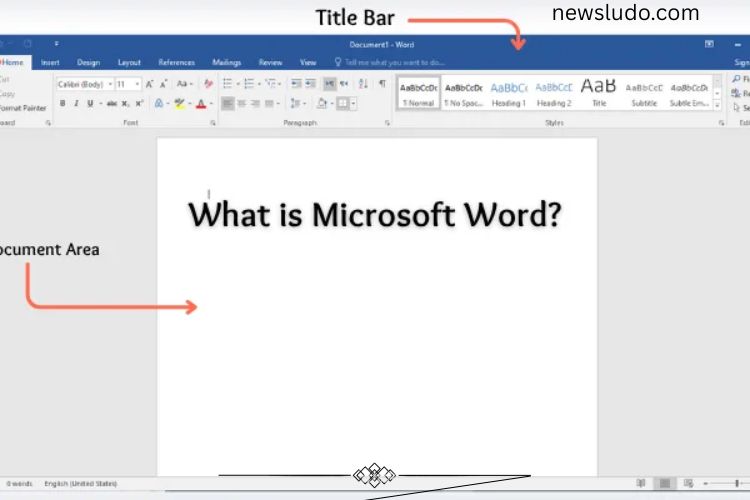
Understanding the Microsoft Word Window
The Word interface is designed to provide all essential tools at your fingertips. Key elements of the window include:
- Title Bar: Displays the current file name.
- Quick Access Toolbar: Offers shortcuts like Save, Undo, and Redo.
- Ribbon: Organizes tools into tabs and groups for easy access.
- Document Area: The main space where you type and edit.
- Scroll Bars: Navigate through large documents.
- Status Bar: Shows page numbers, word count, and language.
- View Buttons & Zoom Slider: Adjust the document view.
These features create a smooth and efficient workflow, allowing users to focus on writing rather than navigating software.
File Extensions in Microsoft Word
Word files can be saved in various formats depending on usage and compatibility. Common file types include:
- .doc: Older Word file format
- .docx: New standard Word format
- .dot / .dotx: Templates for quick document creation
- .pdf: Read-only document format
- .rtf: Rich Text Format
- .txt: Plain text without formatting
- .xml: Structured data format
- .odt: OpenDocument format compatible with other processors
- .mht / .mhtml: Web page format
Advantages of Microsoft Word
Microsoft Word provides a wide range of benefits for users:
- User-friendly interface for all skill levels
- Quickly corrects spelling and grammar mistakes
- Creates neat, professional-looking documents
- Saves time with ready-made templates
- Supports multimedia elements like images and tables
- Compatible with various file formats
- Efficient for school, office, and personal use
- Easy printing and sharing options
Limitations of Microsoft Word
While Word is powerful, it has some drawbacks:
- Requires a paid license for full features
- May run slowly on older computers
- Some tools can be difficult for beginners
- Large files may lag or become unstable
- Regular updates are necessary
- Limited functionality on low-storage devices
Frequently Asked Questions:
What is Microsoft Word used for?
Microsoft Word is used to create, edit, and format documents such as letters, reports, resumes, and books. It allows users to type text, add images or tables, and organize content professionally.
Is Microsoft Word part of Microsoft Office?
Yes, Microsoft Word is a core component of the Microsoft Office suite, which also includes Excel, PowerPoint, and Outlook.
Can I use Microsoft Word online?
Yes, Microsoft offers Word for the web through Office 365, allowing you to create and edit documents online from any device with internet access.
What are the main features of Microsoft Word?
Key features include text formatting, spell and grammar check, templates, tables and images insertion, headers and footers, mail merge, and collaborative editing with track changes and comments.
Which Microsoft Word version should I use?
For most users, Word 2019, Word 2021, or Word 365 is recommended, as they offer modern tools, cloud support, and enhanced collaboration features.
Can I recover unsaved documents in Microsoft Word?
Yes, Word automatically saves backups and offers AutoRecover options to recover unsaved files in case of crashes or accidental closure.
Is Microsoft Word suitable for beginners?
Absolutely! Word is user-friendly, with many intuitive tools and ready-made templates to help beginners create professional-looking documents quickly.
Conclusion
Microsoft Word has revolutionized the way we create, edit, and share documents. With its powerful tools, user-friendly interface, and cloud capabilities, it empowers students, professionals, and creatives to produce polished, professional work with ease. From typing simple letters to designing complex reports, Word streamlines every aspect of document creation, saving time and boosting productivity. Mastering Microsoft Word not only enhances your writing efficiency but also equips you with essential digital skills needed in today’s academic and professional world. Whether you are a beginner or an experienced user, exploring its features fully can unlock your potential and transform the way you work with documents.