
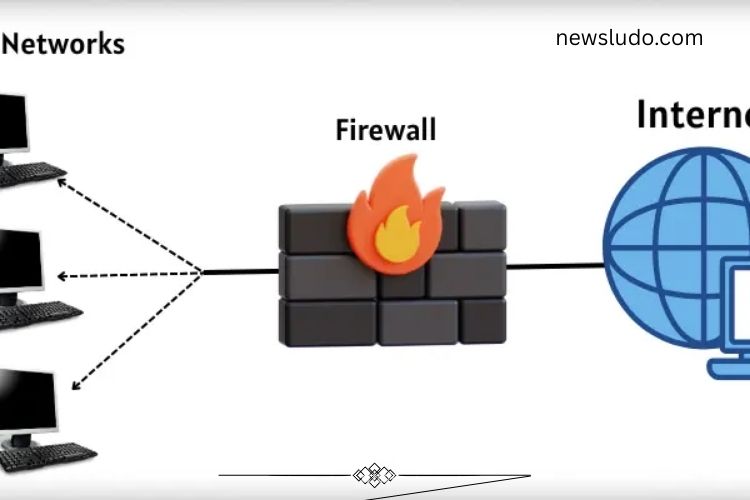
A firewall in a computer network acts as a powerful shield that protects your system from cyber threats. It monitors the flow of data between your computer and the internet, allowing safe information to pass while blocking potentially harmful content. Firewalls are essential for keeping personal data, sensitive files, and network resources secure from hackers, malware, and unauthorized access.
Essentially, a firewall works as a gatekeeper, ensuring only trusted data enters or leaves your system. Whether for home use or large-scale corporate networks, a firewall is a crucial component of cybersecurity.
Read More: https://newsludo.com/mastering-microsoft-word-an-exciting-guide/
How Does a Firewall Work in a Computer Network?
Firewalls function like vigilant security guards for your digital environment. They continuously inspect all incoming and outgoing network traffic, analyzing each file, message, or application request. Any suspicious activity is immediately blocked, while safe information passes through without interruption.
Key functions of a firewall include:
- Monitoring Network Traffic: Examines every data packet moving in and out of your system.
- Blocking Harmful Content: Prevents viruses, malware, spam, and unauthorized applications from accessing your network.
- Allowing Safe Data: Permits trusted files, emails, and apps to function seamlessly.
- Controlling Internet Access: Determines which programs can connect to the internet.
- Alerting Users: Sends notifications when suspicious activity is detected.
This proactive approach ensures your network remains safe, reduces the risk of cyberattacks, and maintains smooth system performance.
Types of Firewalls
Firewalls are available in several types, each designed to protect networks in different ways. Understanding these types helps in choosing the right firewall for your system.
- Packet Filtering Firewall: Examines individual data packets and blocks unsafe ones.
- Stateful Inspection Firewall: Monitors the state of active connections to allow safe data flows.
- Proxy Firewall: Acts as an intermediary, hiding your computer from external threats while filtering content.
- Next-Generation Firewall (NGFW): Combines traditional firewall protection with advanced features like intrusion prevention and application control.
- Software Firewall: Installed on individual computers to block specific threats.
- Hardware Firewall: A physical device that protects entire networks of multiple computers.
Each type offers unique benefits depending on whether the goal is personal protection or enterprise-level security.
Examples of Popular Firewalls
Many individuals and organizations rely on trusted firewalls to safeguard their systems. Some popular options include:
- Windows Defender Firewall: Built into Windows, offering essential protection for personal PCs.
- Norton Firewall: Blocks malware, viruses, and hacking attempts.
- McAfee Firewall: Protects personal and business data from unauthorized access.
- Cisco ASA Firewall: Enterprise-level solution for office networks.
- Fortinet Firewall: Ideal for large-scale networks and corporate environments.
- ZoneAlarm Firewall: User-friendly solution for home users.
Choosing the right firewall depends on your security needs, whether for a single device or a complex network infrastructure.
Advantages and Disadvantages of Firewalls
Firewalls provide critical protection, but they also have limitations. Knowing the pros and cons helps optimize their use.
Advantages:
- Shields computers from hackers and unauthorized access.
- Blocks viruses, malware, and malicious programs.
- Controls which applications can access the internet.
- Protects sensitive personal and business data.
- Monitors all network activity for added security.
Disadvantages:
- Can slightly reduce internet speed.
- May accidentally block legitimate programs.
- Requires regular updates to remain effective.
- Cannot prevent every type of cyberattack.
Despite minor drawbacks, firewalls remain one of the most effective first lines of defense in network security.
How to Enable the Firewall on Your Computer
Activating a firewall is simple but crucial for protecting your system. Follow these steps to ensure your computer is secure:
- Open the Control Panel on your computer.
- Navigate to System and Security.
- Click on Windows Defender Firewall.
- Select Turn Windows Firewall On or Off.
- Enable the firewall for both private and public networks.
- Click OK to save the settings.
Once activated, your firewall will actively monitor traffic and block threats, giving you peace of mind while browsing the internet.
Common Firewall Mistakes to Avoid
Even with a firewall, mistakes can compromise your system’s safety. Avoiding these errors ensures maximum protection:
- Turning Off the Firewall: Keep it enabled at all times.
- Incorrect Configuration: Avoid changing settings without understanding their impact.
- Ignoring Updates: Always install updates for the latest protection.
- Allowing All Programs: Restrict internet access to trusted applications only.
- Neglecting Alerts: Pay attention to notifications and blocked activity to respond promptly.
By following best practices, you can maintain robust firewall security and prevent unnecessary risks.
Frequently Asked Questions:
What is a firewall in a computer network?
A firewall is a security system that monitors and controls the flow of data between your computer and the internet. It blocks harmful content like viruses, malware, and unauthorized access while allowing safe data to pass.
How does a firewall protect my computer?
Firewalls act like digital gatekeepers. They check all incoming and outgoing network traffic, block unsafe programs, and allow trusted applications to communicate freely. This keeps your system safe from hackers, malware, and other cyber threats.
Can a firewall slow down my internet?
Some firewalls may slightly reduce internet speed, especially if they inspect large amounts of data. However, this minor slowdown is outweighed by the protection they provide.
Do I need a firewall for home use?
Yes. Even home networks are vulnerable to cyberattacks. A firewall protects your personal data, prevents unauthorized access, and ensures safer online activity.
Can a firewall stop all cyberattacks?
No firewall can prevent every type of attack. Firewalls are most effective when combined with antivirus software, strong passwords, and safe online habits.
Why is a firewall called “unbreakable”?
While no system is completely invincible, the term “unbreakable” emphasizes the firewall’s role as a strong, essential defense that significantly reduces cyber risks when properly configured and maintained.
How does a firewall differ from antivirus software?
A firewall monitors and filters network traffic, blocking unsafe connections, while antivirus software scans files and programs for malware. Both work together for complete protection.
Conclusion
Firewalls are the cornerstone of network security, acting as a vigilant shield that protects computers, devices, and entire networks from cyber threats. By monitoring incoming and outgoing traffic, blocking harmful data, and allowing trusted information, firewalls keep your digital environment safe and secure. With various types available—from software and hardware firewalls to next-generation solutions—there is a security option for every user, whether for personal devices or large-scale business networks. While no firewall can guarantee 100% protection, combining it with antivirus software, regular updates, strong passwords, and safe online practices significantly reduces cyber risks.